 Watchie
A GPS time clock app for field crews and job sites
Crews clock in and out on their phones, and only at the job site. Off-site punches are flagged for you, drive time between jobs is logged, and a foreman can clock in the whole crew with one tap.
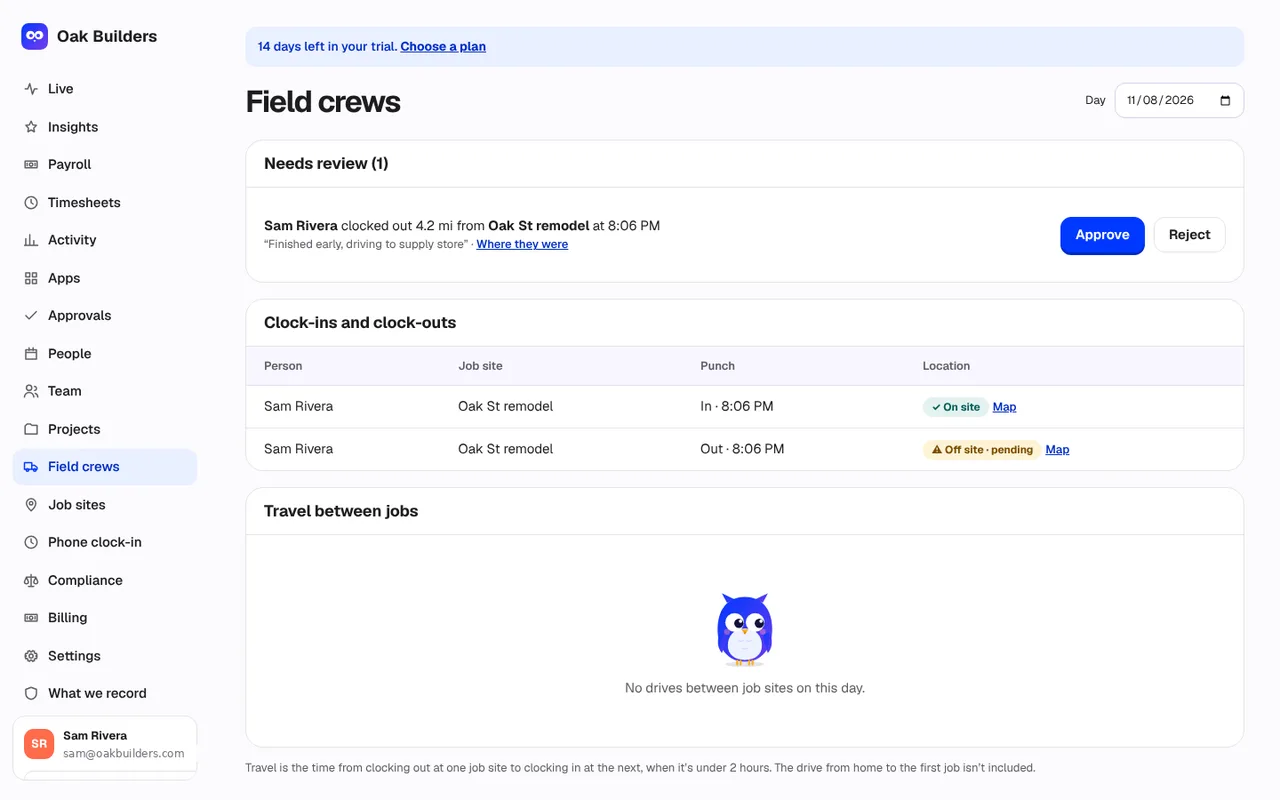
What’s included in field crews
Clock in only at the job site
Each job site has a boundary. A clock-in or clock-out from outside it needs a reason, and it’s flagged for a manager to approve or reject.
Location only at the tap
Watchie reads the phone’s location once, at the moment someone clocks in or out. Never in between, never off the clock.
Drive time between jobs
From clocking out at one site to clocking in at the next, logged for each person and shown on the Field crews page.
Crew clock-in
A foreman or manager can clock in the whole crew at once, right from the job site.
Works without signal
Punches are saved on the phone and sent when the connection comes back, so no hours are lost.
Nothing to install
Crews open Watchie in their phone’s browser and add it to the home screen. Works on iPhone and Android.
Field crews: frequently asked questions
How does job-site clock-in work?
You add each job site with an address and a boundary. Crews open Watchie on their phone, pick the job and tap Clock in. If the phone is outside the boundary, they have to give a reason, and the punch is flagged for a manager to approve or reject.
Does Watchie track my crew all day?
No. Watchie reads the phone’s location only at the moment someone taps clock in or clock out. Never in between, and never off the clock. Crews see this on the clock-in screen.
Do crews need to install an app?
No. Crews use Watchie in their phone’s browser and can add it to the home screen for one-tap clock-in. It works on iPhone and Android.
How is drive time between jobs logged?
When someone clocks out at one job site and clocks in at a different one within 2 hours, Watchie logs the time in between as travel. The drive from home to the first job isn’t counted.
Can a foreman clock in the whole crew?
Yes. Managers and foremen can select crew members and clock them all in or out with one tap from the job site.
What if there’s no signal at the job site?
The punch is saved on the phone and sent as soon as there’s signal again.
What if GPS is inaccurate?
Watchie allows a little margin for normal GPS drift. If the reading is too imprecise to tell, the person is asked to step outside or turn on precise location before clocking in.
More employee time tracking features
Time clock & breaks
Clock in with one click. Bathroom, lunch and personal breaks, with a daily limit and flags when it’s exceeded.
Activity tracking
Clicks, keystroke counts and real mouse movement in 10-minute blocks. Jigglers and auto-clickers stand out.
Screenshots
Every connected monitor, at random moments, 0–3 per 10 minutes. Optional blur. A notice each time.

See who’s really working.
Set up your team in minutes. Clock in on Mac, Windows, or a phone at the job site.
Already have an account? Log in