 Watchie
Labor-law compliance built into employee time tracking
Rules for all 50 states, DC and 24 popular remote-work countries — so W-2 employees, 1099 contractors and overseas contractors each get the right treatment.
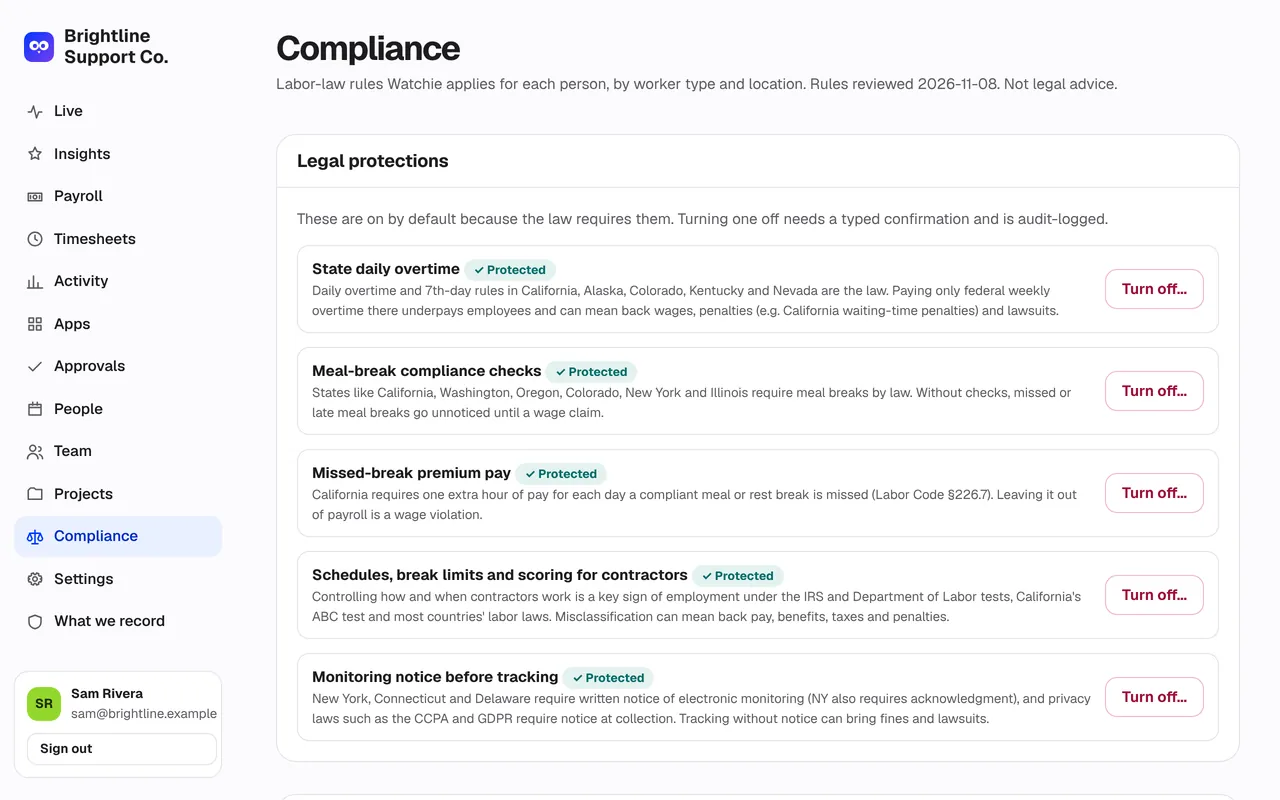
What’s included in compliance guardrails
Employee vs contractor
Contractors are tracked for billing, but schedules, break limits and scoring are off by default to avoid misclassification risk.
Monitoring notice
Everyone sees a plain-language notice before tracking starts, and their acknowledgment is recorded — required in New York, Connecticut and Delaware.
Meal and rest breaks
State meal-break rules are checked every day, with the statute cited.
Big warnings
Turning off a legal rule requires typing a confirmation and a reason. Every manager sees a red banner, and payroll files are marked.
Reviewed every quarter
The rules are re-checked every quarter, and the dashboard tells you if a review is overdue.
Not legal advice
Watchie helps you follow the rules; your employment lawyer has the final word.
Compliance guardrails: frequently asked questions
Which payroll providers does Watchie work with?
Watchie connects directly to Gusto and QuickBooks, and makes import files for ADP and Paychex, plus a contractor payments file.
Does Watchie calculate overtime?
Yes. Daily and weekly overtime follow each state’s rules, including California’s daily overtime and meal-break premiums.
Is employee monitoring legal?
In the US, monitoring work on company time is generally allowed with notice, and some states, including New York, Connecticut and Delaware, require written notice. Watchie shows every person a notice and records their acknowledgment. Rules differ by state and country, so check with your employment lawyer.
Which countries does Watchie cover?
All 50 US states and DC, plus contractor rules for 24 countries where companies commonly hire remote contractors.
Can I turn off a legal protection?
Owners can, but Watchie shows a large warning, asks for a reason and a typed confirmation, and records the change. The page shows the risk until the protection is turned back on.
More employee time tracking features
Time clock & breaks
Clock in with one click. Bathroom, lunch and personal breaks, with a daily limit and flags when it’s exceeded.
Field crews
Phone clock-in that only works at the job site. Off-site punches flagged, drive time between jobs logged.
Activity tracking
Clicks, keystroke counts and real mouse movement in 10-minute blocks. Jigglers and auto-clickers stand out.

See who’s really working.
Set up your team in minutes. Clock in on Mac, Windows, or a phone at the job site.
Already have an account? Log in